Skip to content
Knife Baby
ProductsReviewsDesktop appGamesGuidesDiscord Your dashboard
Log inDashboard
KNIFE.BABYWINDOWS SOFTWARE + HARDWARE

If you’re gonna cheat,
cheat better.

Choose Universal for AI and color features, or Colorbot for color-based control. Connect your hardware and set it up your way.
Explore productsSee the desktop app
Hardware-drivenWindows desktop1PC & 2PC setups
01
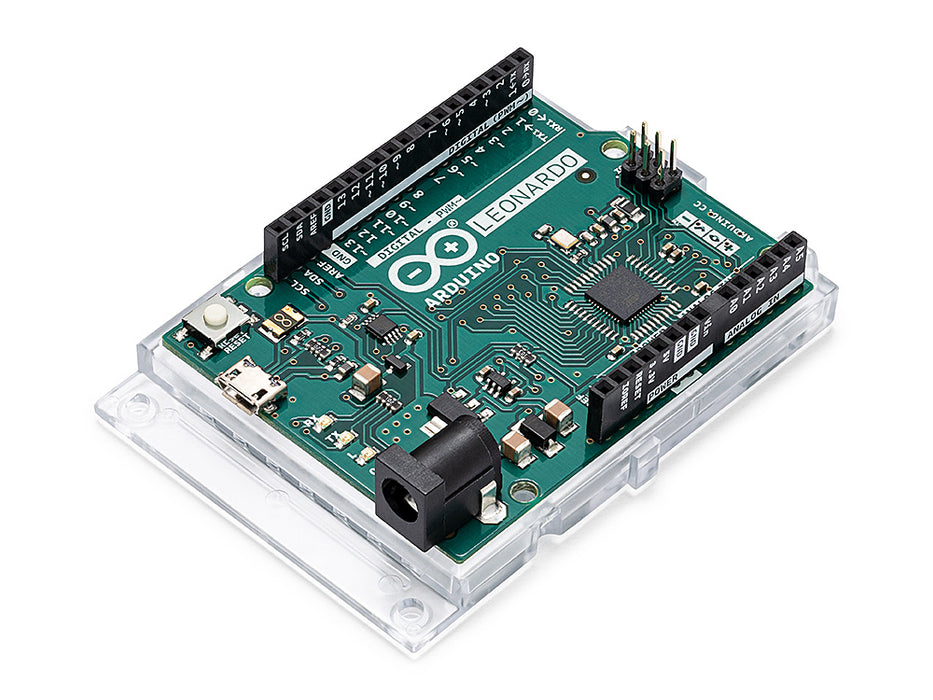
Arduino Leonardo
Arduino LeonardoThe core controller
02
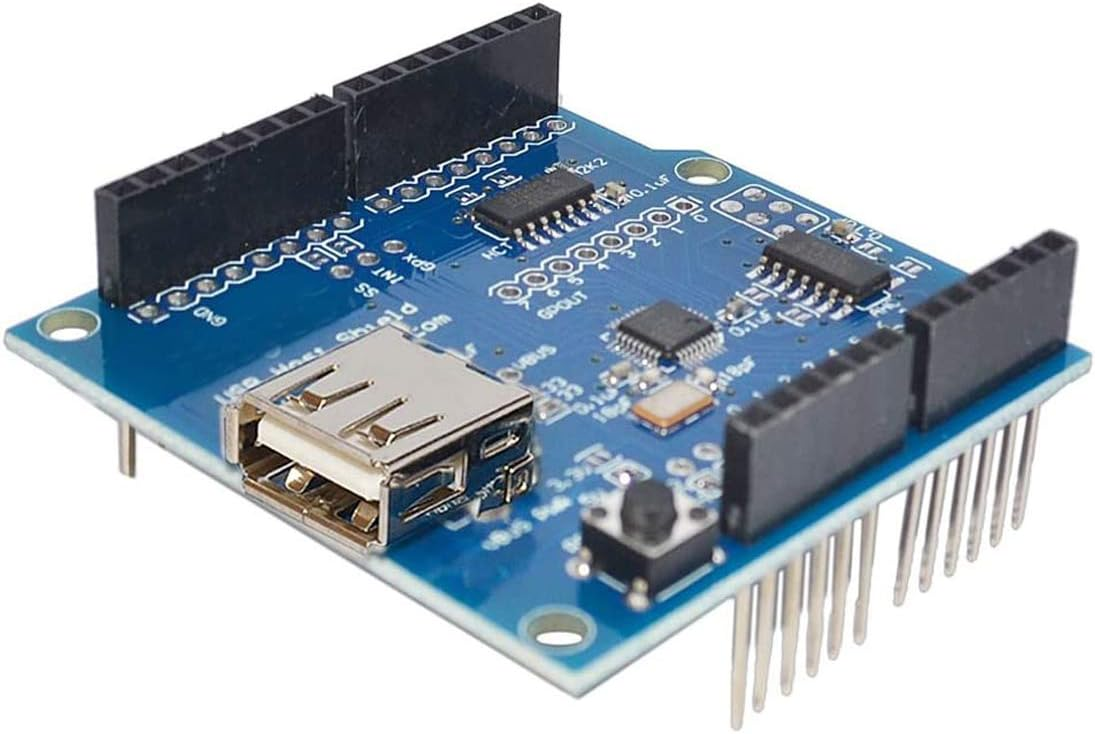
USB Host Shield
USB Host ShieldYour mouse, connected
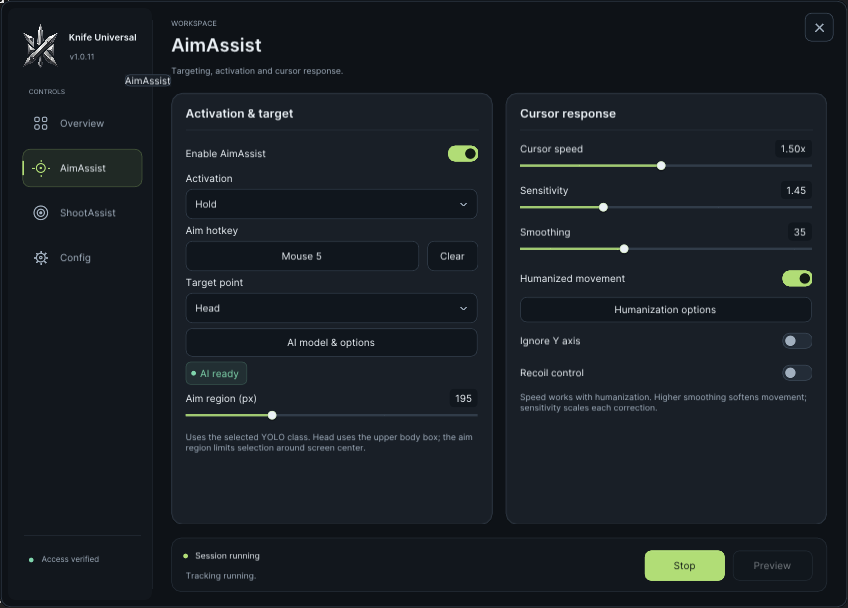
KNIFE Universal
KNIFE Universal Windows app showing activation, AI targeting and cursor response controls
Your settings, in one place
A closer look
KNIFE Colorbot (ZBooster) Windows app showing target color, activation and cursor response controlsMeet Colorbot.Color-based controls, clearly laid out.
✳+
YOUR NEXT SETUP STARTS HERE
ONE CONNECTED SYSTEM
Hardware
+
Software
+
Your settings
Your product. Your settings. Your setup.
CHOOSE YOUR PRODUCT

Choose your product.
See what’s included.

Open a product to see its features, compare plans, and choose the access you need.

THE FLAGSHIP

KNIFE Universal®

Hardware-based mouse control for supported practice environments.

Software access. Hardware purchased separately.
Explore Universal
Knife Universal interface
FOCUSED BY DESIGN

KNIFE Colorbot®

Knife Valorant Colorbot

Software access. Hardware purchased separately.
Explore Colorbot
Knife Colorbot interface
02THE DESKTOP APP

Everything in view.
Nothing in your way.

Change your settings, switch profiles, and check your hardware connection from one Windows app.

Settings and profiles in one placeYour hardware connection at a glanceThe controls you use, easy to find
Open downloadsA look inside the Knife.Baby desktop app.
Made for Windows
KNIFE Universal · Desktop interfaceGet to know your setup
03SUPPORTED GAMES

Find your game.
Check your setup.

View all supported games
Valorant artworkSupported

Valorant

Knife Colorbot · Knife Universal

Roblox artworkSupported

Roblox

Knife Universal

Counter-Strike 2 artworkSupported

Counter-Strike 2

Knife Universal

Call of Duty: Warzone artworkSupported

Call of Duty: Warzone

Knife Universal

Call of Duty: Black Ops 7 artworkSupported

Call of Duty: Black Ops 7

Knife Universal

Fortnite artworkSupported

Fortnite

Knife Universal

A FEW THINGS TO KNOW

Before you
get started.

Answers about products, accounts, and getting connected.

Read all FAQs
What is Knife?+

Knife combines gaming software, mouse passthrough hardware, and an account for managing your access, licenses, and setup.

Which games can I use with Knife?+

The Games page lists current support status and any compatibility notes. Check your game there before choosing a plan.

How are 1PC and 2PC different?+

In 1PC mode the software runs on the gaming PC. In 2PC mode it runs on a secondary PC using a supported serial interface while the controller supplies input to the gaming PC.

How do I choose a setup?+

Use 1PC if you want the software on your gaming PC. Choose 2PC if you have a separate computer and the required interface. Read both guides before buying hardware.

Where should I start?+

Check Requirements, choose a plan, then follow the guide for your hardware and setup mode.

04CHOOSE YOUR SETUP

One PC or two.
Here’s how it works.

Choose a setup guide
01ALL ON ONE PC

1PC Setup

Run Knife.Baby and your game on the same Windows PC. Your mouse connects through a supported USB host board.

Your mouseUSB input
USB host boardLeonardo + shield or RP2040
Gaming PCKnife.Baby + game
Knife.Baby and your game on one PCOpen setup guides
READY WHEN YOU ARE

Find the right product.
Set it up your way.

Compare the products, choose a plan, and follow your setup guide when you’re ready.

Explore productsJoin the Discord
Knife Baby

Products, setup guides,
and support when you need it.

EXPLOREProductsDesktop appSupported games
GET CONNECTEDSetup guidesHardware requirementsSupportYour account
STAY IN THE LOOPDiscordCustomer reviewsPrivacy policyTerms of serviceEULA
© 2026 KNIFE. All rights reserved.KNIFE.BABY · BUILT FOR YOUR SETUPBack to top ↑

Support varies by product and can change after a game update. Check the latest notes for your game and hardware before choosing a plan.

02SEPARATE SOFTWARE PC

2PC Setup

Run Knife.Baby on your second PC. Your gaming PC runs the game and OBS, with both PCs connected to the same wired network.

Second PCKnife.Baby app
Your boardLeonardo or Arduino Due
Gaming PCGame + OBS
Knife.Baby on your second PCOpen setup guides
01CUSTOMER REVIEWS

What customers are saying.

Read what customers think about the products and their experience with Knife.Baby.

5 / 56 reviews

Reviews scroll continuously. Hover or focus a review to pause. Use the arrow controls, swipe, or press the left and right arrow keys to browse.

5.0
I was hardstuck in Silver but now I am Diamond. I also use it sometimes in COD and Fortnite.
D
demind1#0Knife Universal
Verified buyer
5.0
5.0
5.0
5.0
5.0
Write your review Read all reviews
W knife.baby
S
spideyKnife Universal
Verified buyer
I recently purchased this product and I’m genuinely impressed with its overall quality and performance. The build quality feels solid and premium, and the product looks exactly as expected. It is well-designed, easy to use, and performs reliably in everyday use.
X
xzoro0869#0Knife Universal
Verified buyer
5 months with Knife 1PC Still no bans. I am immortal 2 now. Valorant cheat scene is weak compared to this. 🗡️✨
F
fluxxo.01#0Knife Universal
Verified buyer
Best AI Aimbot ever Made
K
knife.baby#0Knife Universal
Verified buyer
+rep KnifeMan
G
goatjames69#0Knife Universal
Verified buyer